Bookings
Operations → Bookings — every appointment, past and future. Needs booking:read; acting on a booking needs booking:manage.
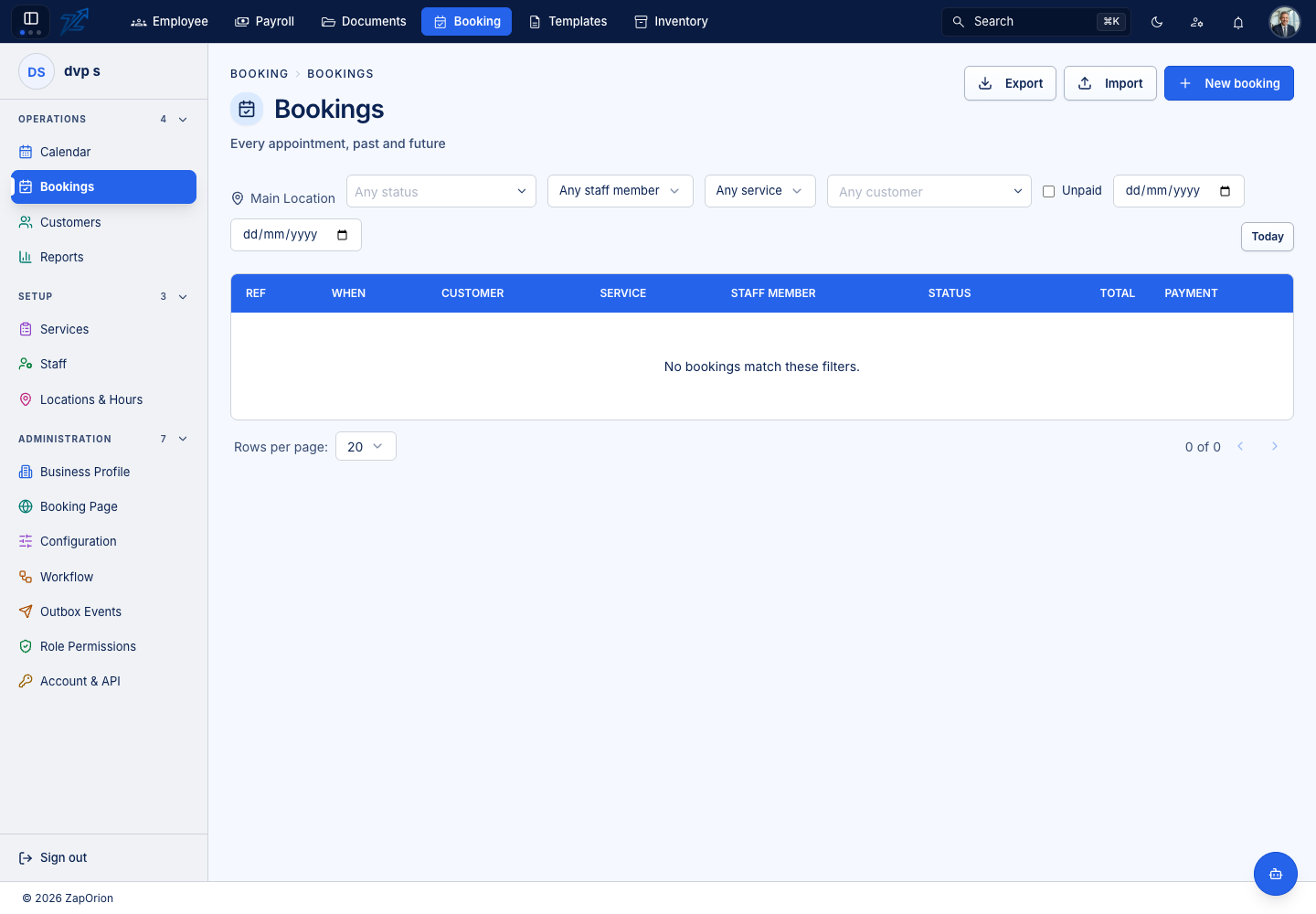
The list
| Column | Meaning |
|---|---|
| Ref | The booking reference |
| When | Start date and time |
| Customer / Service / Staff member | Who, what and with whom |
| Status | Where the booking is in its lifecycle |
| Total / Payment | The price and whether it is paid |
Filter by location, staff member, service, status and a From / To date range. Today jumps to today; Unpaid shows bookings with a balance due. Export downloads what the current filters show as a spreadsheet, and Import creates many appointments from a spreadsheet. New booking opens the wizard.
Importing bookings
Import walks through four steps: download the Template, Choose file, Check rows (each row is validated and marked Ready or given its reason for failing) and Import. The page explains how the sheet is read, its columns and what happens on import. Nothing is created until you confirm.
The lifecycle
 Pending ──► Confirmed ──► Completed
    │            │
    │            ├──► No show
    │            └──► Cancelled / Rescheduled
    ├──► Rejected
    ├──► Expired      (set automatically, never by a person)
    └──► Cancelled
- Pending and Confirmed are the live states — they still reserve the slot. If the business confirms bookings automatically, new bookings skip Pending.
- Rescheduled is kept distinct from Cancelled so reports can tell "changed their mind about the time" from "did not come".
- Expired is applied by the system's background sweep, never by a person.
- Your own status names (see Workflow) can be laid over these, but the engine reads only the underlying state — renaming "Confirmed" never releases the slot.
The booking page
Click a booking to open its page.
- Actions — depending on the state: Confirm, Reject, Complete, No show, Reschedule and Cancel (with an optional reason; a Cancellation reason is kept on the booking).
- Details — party size, start and end, when the slot was held, the booking's source, the customer's email and phone, internal notes and any custom fields (Additional details).
- Charges — subtotal, add-ons, tax and total, with Paid and Balance due.
- Payments — what has been collected, and Record a payment: an amount and a method (Cash, Card, Bank transfer, Other), or Redeem session from a package the customer holds. Refund returns money or hands a package session back. See Payments.
- Review — Record review saves a review for moderation; Send review email creates a link the customer can use. See Reviews.
- History — every change, with who made it.
Rescheduling
Reschedule opens a panel with the availability grid for the new time. A business can limit how many times one booking may be moved and how much notice a move needs (see Configuration → Booking rules); a late cancellation may attract the configured fee percentage.